
Framer Templates or Custom Website: Which One Is Worth?

Slava Burian
Guides
10 min read


Building a website in Framer comes with an early decision that shapes everything else: start from a Framer template or build something custom from scratch.
Most people treat this as a budget question. It's not. It's a question of time, fit, and how much your website actually needs to stand out. In 2026, the gap between a well-executed Framer template and a custom build has narrowed significantly — but the decision still matters. A freelancer launching a portfolio has different requirements than a SaaS startup trying to convert investors.
This guide breaks down the Framer template vs custom design choice honestly — what you get, what you give up, and a clear framework to make the call without second-guessing yourself later.
What You Really Get With a Framer Template
A Ready Structure in Minutes — Why Templates Save Days, Not Just Hours
The biggest advantage of a Framer template isn't the design — it's the head start.
When you open a template, the core decisions are already made: page structure, section hierarchy, navigation logic, and basic interactions. You're not staring at a blank canvas wondering where the hero section ends and the features block begins. That structure alone saves several hours of layout work before you've written a single line of copy.
For freelancers working with tight client deadlines, this matters a lot. A well-built framer website template compresses the gap between "project kickstart" and "ready to show the client something." Instead of spending day one on scaffolding, you spend it on content and messaging.
Templates also handle the technical groundwork. Responsive breakpoints, component consistency, basic animation — these are already baked in. You're inheriting decisions made by someone who thought through the design system so you don't have to.

Built-in CRO: How Good Templates Are Already Optimized to Convert
A template gives you structure. It doesn't give you a finished website — but a good one gives you more than just layout.
What you're buying is a starting point: layout, typography scale, color system, and a set of reusable components. What you still need to bring: your content, your brand voice, your images, and real customization work to make it feel like yours.
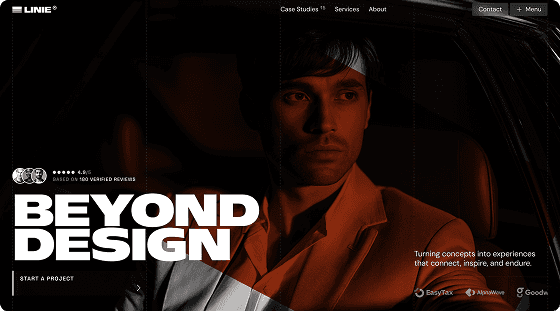
Good templates also come with conversion-oriented structure built in. That means logical page flow, clear visual hierarchy, and sections positioned where users expect them — hero with a single CTA, social proof above the fold, pricing or services easy to find. This isn't accidental. Purpose-built templates are designed with CRO principles in mind: reducing friction, guiding attention, and making it obvious what the visitor should do next. A template like Linie — built specifically for creative agencies and studios — structures the page so the visitor's eye moves naturally from the work to the contact.
A well-structured template doesn't just look good — it's already optimized to convert.
That said, CRO only works if the content does its job. The template can put a CTA button in the right place, but you need to write the headline that makes someone click it.
Template vs Custom: The Full Comparison
Before diving deeper, here's the honest side-by-side of both options:
Factor | Framer Template | Custom Design |
|---|---|---|
Time to launch | 1–2 weeks | 4–10 weeks |
Cost (professional) | $49–$249 (template) + customization | $3,000–$8,000+ |
Cost (DIY) | Low — customization hours only | High — full build from scratch |
Visual uniqueness | Medium — depends on customization depth | High — fully bespoke |
CRO structure | Built-in (good templates) | Fully custom |
Scalability | Medium — depends on template architecture | High |
Maintenance | Straightforward | Requires design system discipline |
Best for | MVPs, freelancers, tight timelines, SMBs | Brand-critical, complex, long-term builds |
This table covers the most common scenarios. Edge cases exist — a badly built custom site can underperform a great template, and a purpose-built template can outperform a rushed custom build every time.
Building a Custom Framer Website from Scratch: What It Really Costs
Design System First — Why Custom Starts Before the First Page
"Custom" doesn't mean opening Framer and drawing boxes. It means making a hundred decisions before you design a single section.
That process starts well before the canvas: researching competitors, mapping user journeys, deciding what the visitor should do on each page and in what order. Where does the social proof go? What's the primary CTA on the pricing page? Which sections earn attention above the fold? These are UX and CRO questions — and getting them wrong costs more than getting the typography wrong.
Then comes the design system: type scale, spacing tokens, color architecture, component structure. In Framer, every button, card, nav, and section needs to be built as a reusable component from the start. Skip this and you'll spend the last third of the project fixing inconsistencies instead of refining the work.
Custom design isn't just about how a site looks — it's about how it thinks. The research, the UX logic, the CRO structure — that's where the real time goes.
For experienced Framer designers, the setup and research phase alone takes one to three days. For someone newer to the process, significantly longer.
Real Numbers: Time and Budget for a Custom Framer Site in 2026
Custom website design in Framer costs more than people expect — in both time and money.
If you're hiring a Framer designer, a proper custom website design for a 5–7 page site typically runs $3,000–$8,000+ depending on complexity. That range moves up fast once you add custom animations, CMS integration, or complex interaction design.
If you're doing it yourself, the cost is time. Expect 40–80 hours on a mid-complexity custom site if you're already comfortable with Framer. If you're learning as you go, double that estimate.
Neither number is wrong. But both need to be weighed against what you're getting: a site that fits your brand exactly, has no ceiling on what it can do visually, and doesn't share its structure with any other website.
Custom design isn't expensive because designers are overcharging. It's expensive because the work is genuinely substantial.
When a Framer Template Is the Smart Choice, Not a Compromise
4 Project Types Where Templates Clearly Win
Templates aren't a fallback. For a lot of projects, they're the correct decision.
Here's when a framer website template makes clear sense:
Tight timeline. A client needs something live in two weeks. A template gets you to a presentable, functional site in a fraction of the time a custom build requires. The alternative isn't "custom design in two weeks" — it's a rushed custom design that looks like it was done in two weeks.
MVP or early-stage product. At the validation stage, your website's job is to communicate what you do clearly enough to get a response. It doesn't need to be unique — it needs to be clear. A clean, well-structured template does that job well.
Freelancer managing multiple projects. Every hour you spend on custom scaffolding for one client is an hour you're not billing somewhere else. Templates shift your time to the work clients actually care about: copy, content strategy, and meaningful customization.
Constrained budget. A quality custom website design costs real money. If the budget doesn't support a proper custom build, a well-chosen template executed well beats a half-finished custom site every time.

How Far Can You Actually Customize a Framer Template?
More than most people assume — if the template was built well.
In Framer, you can restyle every component, swap color systems, change typography, rearrange sections, add or remove pages, and build new components on top of the existing structure. The template's visual identity is not fixed.
If you need to significantly alter that architecture, you'll hit friction. Trying to turn a minimal portfolio template into a multi-page SaaS site with complex navigation will feel like fighting the template rather than working with it. That's a sign the template wasn't the right fit for the project.
The rule of thumb: customize the surface freely, but choose a template whose structure already fits your content needs.
When Custom Design Is the Only Real Option
Brand-Critical Projects with No Room for Defaults
Some projects can't afford to look like anything else. A custom website design isn't a luxury in these cases — it's a requirement.
If your brand has a strong visual identity, a template will work against you. Typography choices, spacing rhythms, interaction style — these are all baked into a template's DNA. The more defined your brand, the more those defaults get in the way.
Custom design also gives you full control over page architecture. Need a non-linear storytelling structure, a product demo woven into the scroll experience, or a case study layout that works differently from anything in your industry? That's only possible when you're designing from the ground up.
When your website needs to do something specific to your brand or product, custom is the only path that doesn't involve compromise.

Long-Term Scalability: When Your Site Needs to Grow With You
A template is designed for a specific scope. When your business grows beyond that scope, the template starts to resist you.
Adding a new product line, expanding to multiple languages, building a resource hub with dozens of CMS entries — these are the moments where custom architecture pays off. A well-built custom Framer site has a component system and page structure designed to grow. A template adapted beyond its original intent becomes increasingly fragile.
If you know from the start that your site needs to expand significantly within 12–18 months, that's a strong argument for investing in a proper custom build now rather than rebuilding later.
Template Customization: What's Easy, What's Hard, and Where to Get Help
Easy Wins: Colors, Fonts, Copy, Images
Most of what makes a template feel generic is also the easiest to change.
Swapping the color system, updating typography, replacing placeholder images with real photography, rewriting all copy in your brand voice — these changes are straightforward in Framer and can be done by anyone comfortable with the editor. Done well, they take a template from "recognizable" to "completely yours" in the eyes of most visitors.
Component-level restyling is also accessible: button shapes, card layouts, section padding, icon sets. None of this requires touching the underlying component structure.
Harder Changes: Page Architecture and Complex Navigation
Where customization gets difficult is at the structural level.
Reorganizing the page hierarchy, adding new page types that weren't part of the original template, building complex multi-level navigation, or wiring up CMS collections to template components — these require deeper Framer knowledge and more time. Not impossible, but meaningfully harder than surface-level restyling.
The practical implication: if your project requires significant structural changes, either choose a template closer to your actual needs or factor the extra time into your timeline honestly.
Done-for-You: Customization Service
If you'd rather hand the customization work to someone who knows Framer templates inside out, we at Templita offer a done-for-you service — we take one of our purpose-built Framer templates and customize it to match your brand. It's a practical middle ground between buying a raw template and commissioning a full custom build: you get a professionally finished site without the custom build timeline or budget.
How to Decide in 2026 — A 7-Question Checklist
Answer these honestly before committing to either path:
# | Question | Template | Custom |
|---|---|---|---|
1 | Do you need the site live within 2–3 weeks? | ✓ | |
2 | Is your budget under $1,500 total? | ✓ | |
3 | Is this an MVP or early-stage project? | ✓ | |
4 | Does your brand have a rigid, distinctive visual identity? | ✓ | |
5 | Will the site need significant expansion in the next 12 months? | ✓ | |
6 | Do you need custom interactions or non-standard page architecture? | ✓ | |
7 | Are you a freelancer managing multiple active projects? | ✓ |
Use a template if you answered ✓ Template on 2 or more questions and your project scope fits a well-chosen template's structure.
Go custom if your brand demands it, your project is structurally complex, or you know the site needs to grow well beyond what a template was designed to handle.
One more consideration: the quality of the template matters as much as the decision to use one. A purpose-built framer website template designed for a specific use case will perform significantly better than a generic one. Browsing a curated Framer templates marketplace rather than grabbing the first free option is always worth the extra time.
Conclusion
The Framer templates or custom website decision isn't about which option is better in the abstract. It's about which one fits your project's actual constraints and goals.
In 2026, templates have gotten better — more purposefully built, with stronger CRO structure and cleaner code. The gap between a well-executed template and a custom site is smaller than it used to be. That makes the decision less about prestige and more about fit.
Templates win when speed, budget, and clarity of scope align. Custom design wins when your brand has no room for compromise or your project scope is too complex for template architecture.
The worst outcome isn't choosing the wrong option — it's executing the right option poorly. A template pushed beyond its design intent becomes a maintenance problem. A custom build started without a proper design system becomes an expensive inconsistency.
Start with scope. Be honest about budget and timeline. Then pick the path that fits — and commit to it properly.
FAQ
1. Is it better to use a Framer template or build from scratch in 2026?
For most projects — especially MVPs, freelancer client work, and small business sites — a well-chosen template is the smarter move. Custom builds make sense when brand requirements are strict, project scope is complex, or long-term scalability is a priority from day one.
2. Can you make a Framer template look completely unique?
Yes, with the right customization work. Colors, typography, imagery, copy, and component restyling can take a template far from its original look. The underlying structure stays the same, but most visitors will never notice. The limit comes when you need to fundamentally change page architecture.
3. How much does a custom Framer website cost in 2026?
A professional custom build for a 5–7 page site typically runs $3,000–$8,000+. Complex projects with custom animations or CMS integration go higher. DIY custom builds cost 40–80+ hours if you're already experienced with Framer.
4. Are Framer templates good for SEO?
Yes — Framer renders pages server-side, supports configurable meta tags and Open Graph per page, and generates sitemaps automatically. Template-based or custom, the SEO foundation is solid. What matters is how you fill in the content: unique meta descriptions, proper heading structure, and optimized images.
5. What's the real difference between a free Framer template and a paid one?
Free templates are typically single-page or minimal, with limited component variety and no ongoing support. Paid templates — especially purpose-built ones from specialist marketplaces — include multiple page types, a coherent component system, CRO-informed layout, and documentation. For any serious project, a quality paid template is worth the price difference.
Explore More Articles
Keep reading.


