Framer vs WordPress: Which Should You Use in 2026?

Slava Burian
Comparison
11 min read



If you've been running a WordPress site for a few years, you know the drill. A plugin breaks after an update. Your page speed drops. You spend an afternoon fixing something that should just work. Meanwhile, Framer has been quietly building a reputation as a cleaner, faster alternative — especially for business owners and creatives who don't want to manage a server just to keep their site online.
This article breaks down the real differences between Framer and WordPress. Not just features on paper — but what it actually feels like to use each one, what it costs when you add everything up, and what migration from WordPress to Framer looks like in practice. By the end, you'll know which platform fits your situation.
What Makes Framer and WordPress Fundamentally Different
WordPress launched in 2003 as a blogging tool. Over time it became a full CMS — and today it powers over 40% of all websites. That reach comes from flexibility. WordPress lets you extend almost anything. Want SEO tools? Plugin. Want a membership site? Plugin. The trade-off is complexity. You manage the hosting, the updates, and every moving part yourself.
Framer started as a design prototyping tool and became a full website builder around 2022. It's hosted, managed, and built around a visual editor. No server to configure, no separate hosting bill, no maintenance queue. You design and publish from one place.
Framer also has its own plugin ecosystem — lighter than WordPress, but growing. You can add SEO analyzers, icon packs, and other tools directly inside the editor. Most of them install in one click and don't require any configuration.
Here's how the two platforms compare across every major dimension:
Feature | Framer | WordPress |
|---|---|---|
Hosting | Included | Self-managed (separate cost) |
Setup time | 15–30 minutes | 1–3 hours minimum |
Plugins / extensions | Lightweight plugin ecosystem | 60,000+ plugins |
Visual editor | Native, design-first | Requires page builder (Elementor etc.) |
CMS / collections | Built-in, relational | Core feature, highly extensible |
SEO tools | Built-in + plugins | Yoast, Rank Math |
Performance | Managed CDN, fast by default | Depends on hosting + plugins |
Security | Fully managed | Your responsibility |
E-commerce | Limited (third-party) | WooCommerce (powerful) |
Design freedom | High — animations, scroll effects | Limited without a developer |
Learning curve | Low–Medium | Medium–High |
WordPress wins on ecosystem depth and publishing power. Framer wins on setup speed, design quality, and zero maintenance overhead.
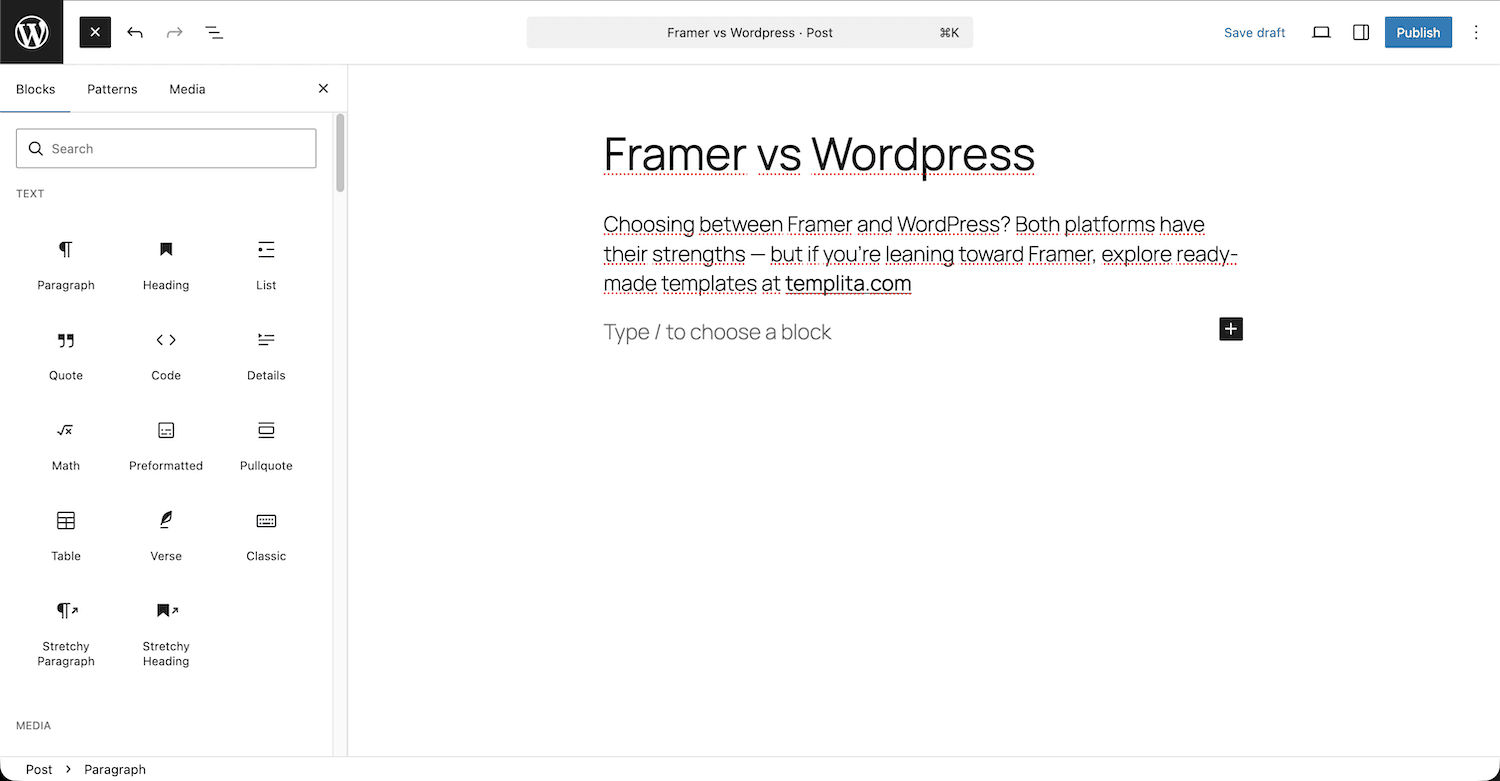
WordPress block editor
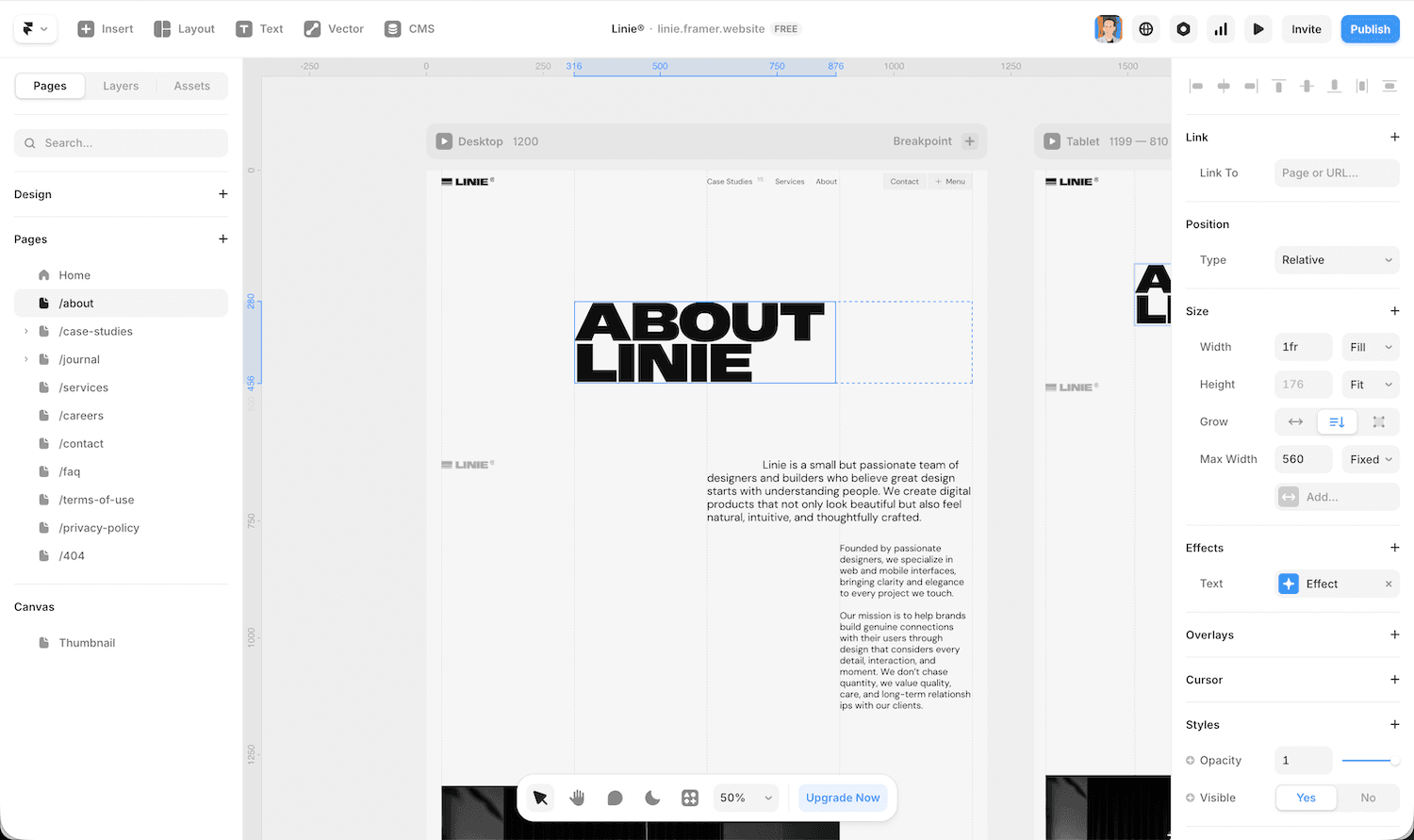
Framer visual editor with the Linie template
Ease of Use — Which One Won't Drive You Crazy
For a non-technical user, the onboarding experience on each platform feels completely different.
WordPress Setup Friction
Getting a WordPress site live involves more steps than most beginners expect. You need to buy a domain, choose a hosting provider, install WordPress, pick a theme, then add plugins for SEO, forms, caching, and security. Each plugin adds a settings panel. Each update is a potential conflict.
The block editor is more visual than the old interface, but it still feels like a content tool — not a design tool. If you want real layout control, you'll need Elementor or a similar page builder on top.
How Fast Can You Build in Framer?
Framer starts with a template or a blank canvas — if you want a head start, there are purpose-built options like Drive for SaaS businesses or Boutiq for e-commerce. You drag elements, set styles, and publish — all from one interface. There's no hosting setup, no plugin configuration, and no separate SEO dashboard. Everything is in one place.
For a business owner who needs a professional site without hiring a developer, Framer gets you there much faster. A basic site can go live in a day. On WordPress, that same site typically takes a week once you factor in theme setup, plugins, and troubleshooting.
Speed and Performance — Core Web Vitals Compared
Page speed affects both user experience and search rankings. This is one area where the two platforms differ the most — not because of features, but because of architecture.
Why WordPress Sites Get Slow
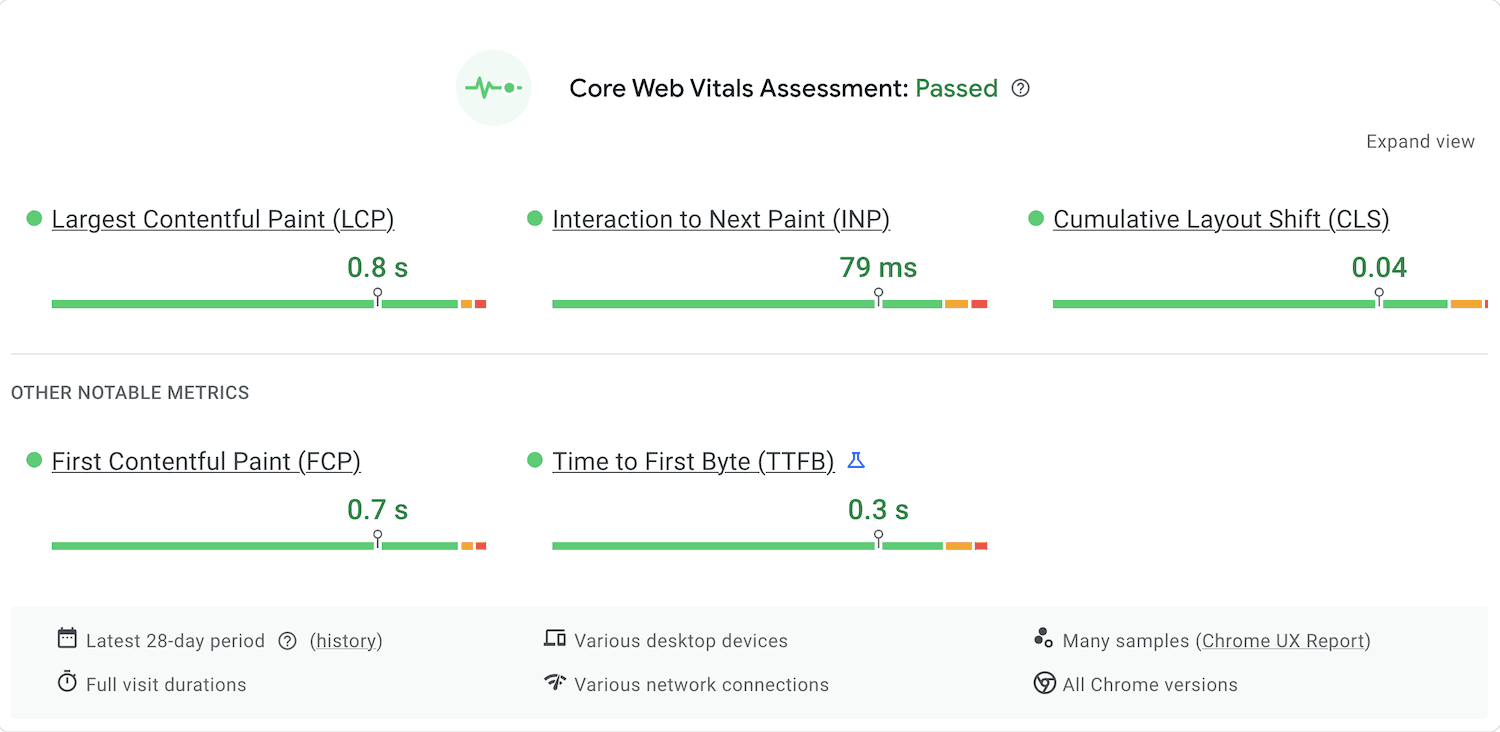
WordPress performance depends entirely on your setup. A bloated theme and several active plugins can push your Largest Contentful Paint (LCP) well past Google's 2.5-second threshold. Most WordPress sites need a caching plugin, a CDN, and image compression just to hit acceptable Core Web Vitals scores. That's three extra tools to configure and maintain.
How Framer Handles Performance Out of the Box
Framer hosts every site on a global CDN automatically. Images are optimized on upload. There's no plugin stack adding render-blocking scripts. Most Framer sites hit strong Core Web Vitals scores without any manual optimization.
Performance Factor | Framer | WordPress |
|---|---|---|
CDN | Included | Requires Cloudflare or similar |
Image optimization | Automatic | Plugin required |
Caching | Handled by Framer | Plugin required |
Render-blocking scripts | Minimal | Depends on plugins/theme |
Core Web Vitals out-of-box | Strong | Requires manual work |
For business owners who don't want to think about page speed, Framer removes the problem entirely. WordPress can match Framer's performance — but only with the right setup and someone who knows what they're doing.
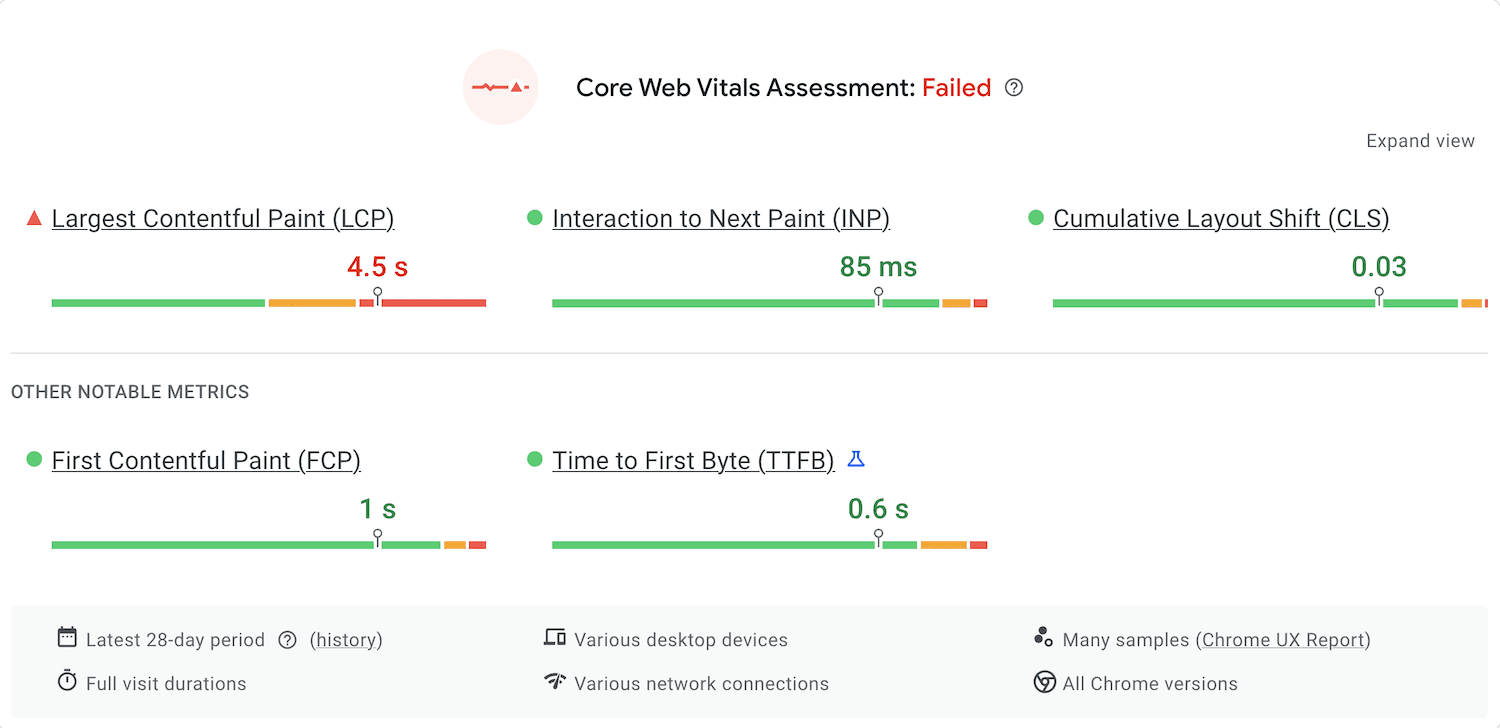
WordPress.com Core Web Vitals Score
Framer.com Core Web Vitals Score
Design Freedom and Animations — Where Framer Wins
This is the category where Framer has the clearest advantage, especially for designers and visually-driven brands.
What You Can Build Visually in Framer
Framer was built by designers, for designers. You get direct control over layout, typography, spacing, and motion — without writing CSS. Scroll-triggered animations, hover effects, parallax sections, and page transitions are all built in. These are the kinds of interactions that usually require a front-end developer on WordPress.
Framer also handles responsive breakpoints with granular control — you adjust exactly how your site looks on mobile, tablet, and desktop independently.
WordPress Design Limitations Without a Developer
WordPress themes give you a starting point, but customization has a ceiling. For anything beyond basic layout — custom animations, scroll effects, advanced interactions — you need a premium page builder or custom code. Most business owners hit that ceiling fast.
Design Capability | Framer | WordPress (no developer) |
|---|---|---|
Visual layout control | Full | Limited to theme/block editor |
Scroll animations | Built-in | Plugin or custom code |
Hover effects | Built-in | Limited |
Custom typography | Full control | Theme-dependent |
Responsive breakpoints | Per-breakpoint control | Basic |
Page transitions | Built-in | Rare, needs custom code |
No-code animations | Native | Not available by default |
If visual quality matters to your business, Framer gives you more design leverage without touching code. This gap is especially significant for agencies and studios building client sites — which is why Framer templates are increasingly built around creative and service businesses — like Linie, designed specifically for agencies and studios that need both speed and design quality.
SEO — Can Framer Compete with WordPress?
SEO is the biggest concern for anyone thinking about leaving WordPress. It's a fair one — WordPress has a 20-year head start and a plugin ecosystem built around search.
WordPress SEO Ecosystem
With Yoast SEO or Rank Math, WordPress gives you granular control over every SEO element. Title tags, meta descriptions, canonical URLs, XML sitemaps, schema markup, breadcrumbs, redirect management — all configurable without touching code. For large content sites with hundreds of pages, this depth matters.
Framer's Built-In SEO Tools
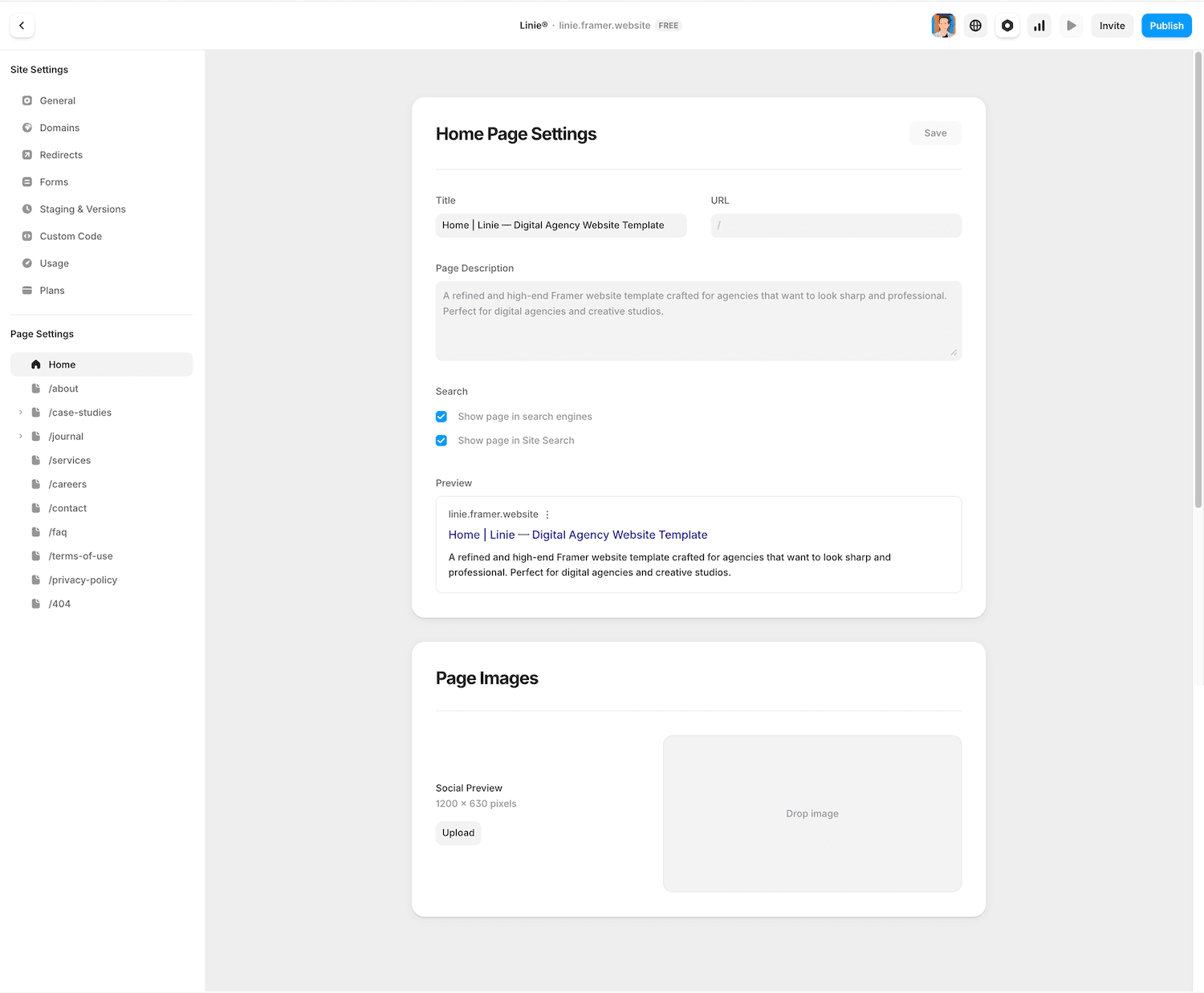
Framer has closed the gap significantly. You can edit title tags and meta descriptions per page, set canonical URLs, manage 301 redirects, generate XML sitemaps automatically, and add custom JSON-LD schema via code — all covered in detail in our Framer SEO optimization guide. Framer also supports SEO analyzer plugins that give you on-page recommendations inside the editor.
SEO Feature | Framer | WordPress (Yoast/Rank Math) |
|---|---|---|
Title & meta tags | ✓ Per page | ✓ Per page + templates |
XML sitemap | ✓ Automatic | ✓ Auto + custom |
301 redirects | ✓ Built-in | ✓ Plugin required |
Canonical URLs | ✓ | ✓ |
Schema markup | ✓ Custom JSON-LD via code | ✓ GUI + auto |
Robots.txt | ✓ | ✓ |
SEO analyzer | ✓ Via plugin | ✓ Yoast/Rank Math |
WordPress still has an edge for large content operations. But for a business website — even one with dozens of pages and an active blog — Framer's SEO tools cover everything you realistically need. The gap only becomes meaningful when you're managing hundreds of posts and need bulk editing or automated schema at scale.
" height="40px" id="SHxZVWPpt" width="40px"/></svg>)
"Framer is a great platform for any website owner who cares about SEO. It's one of the fastest-loading, most innovative hosted website platforms out there at the time of writing this."
Content Management — Framer CMS vs WordPress
If you plan to publish content or manage structured data, CMS capability becomes critical.
WordPress as a Publishing Engine
WordPress was built for publishing. You get custom post types, taxonomies, categories, tags, author roles, scheduled posts, revision history, and editorial workflows out of the box. For media sites or large blogs publishing daily, it's hard to beat.
Framer CMS — More Capable Than You Think
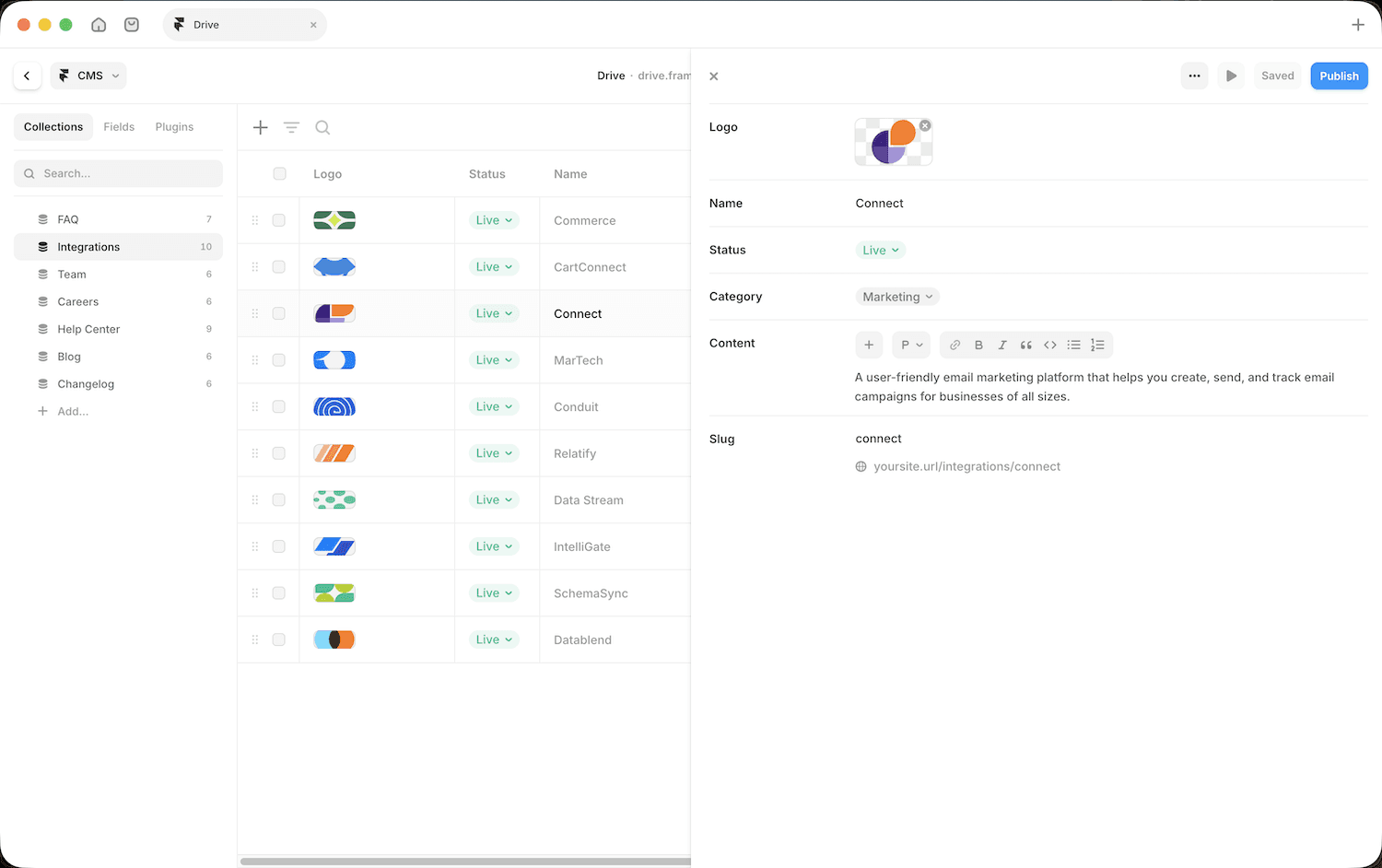
Framer CMS is built around Collections — structured content databases you define yourself. Blog posts, case studies, team members, services — each gets its own collection with custom fields. What would require custom post types in WordPress comes pre-structured in templates like Drive — ready to populate on day one. It's visual, fast to set up, and doesn't require any configuration outside the editor.
A few things worth knowing that often get overlooked:
Collection References let you link content across collections — for example, connecting posts to authors or categories
Multi-reference fields let you assign multiple tags or categories to a single item
Collaboration is built in — multiple editors can work on the site at the same time
Relational CMS structure means you can build complex content relationships without custom code
CMS Feature | Framer CMS | WordPress |
|---|---|---|
Blog / collections | ✓ | ✓ |
Custom content types | ✓ Via collections | ✓ Custom post types |
Categories & tags | ✓ Multi-reference fields | ✓ Full taxonomy |
Collection references | ✓ | ✓ |
Multi-author collaboration | ✓ Built-in | ✓ With roles |
Scheduled publishing | Limited | ✓ |
Revision history | ✗ | ✓ |
Content volume | Medium–large | Unlimited |
For a content-driven business — a blog, a case study library, a services site with dynamic pages — Framer CMS handles the job well. Where WordPress pulls ahead is high-volume publishing: daily posts, large editorial teams, and complex taxonomy structures with thousands of entries.
" height="40px" id="rjbK8FTRN" width="40px"/><path d="M 26.641 12.014 C 26.645 12.288 26.611 12.562 26.539 12.826 C 26.467 13.091 26.358 13.344 26.215 13.578 C 26.073 13.812 25.898 14.025 25.696 14.211 C 25.494 14.396 25.267 14.552 25.021 14.674 C 25.027 14.747 25.031 14.821 25.034 14.894 C 25.04 15.041 25.04 15.188 25.034 15.334 C 25.031 15.408 25.027 15.481 25.021 15.554 C 25.021 20.034 19.801 23.674 13.361 23.674 C 6.921 23.674 1.701 20.034 1.701 15.554 C 1.696 15.481 1.691 15.408 1.689 15.334 C 1.683 15.188 1.683 15.041 1.689 14.894 C 1.691 14.821 1.696 14.747 1.701 14.674 C 0.923 14.317 0.34 13.635 0.109 12.81 C -0.123 11.985 0.02 11.1 0.499 10.389 C 0.977 9.679 1.744 9.214 2.595 9.119 C 3.447 9.024 4.297 9.307 4.921 9.894 C 5.494 9.506 6.093 9.16 6.716 8.859 C 7.338 8.558 7.982 8.302 8.641 8.094 C 9.301 7.886 9.975 7.726 10.657 7.616 C 11.34 7.505 12.03 7.445 12.721 7.434 L 14.201 0.494 C 14.218 0.414 14.25 0.338 14.297 0.27 C 14.343 0.202 14.402 0.144 14.471 0.1 C 14.54 0.055 14.617 0.025 14.698 0.01 C 14.778 -0.005 14.861 -0.003 14.941 0.014 L 19.841 0.994 C 20.336 0.145 21.374 -0.219 22.29 0.135 C 23.207 0.489 23.731 1.456 23.526 2.417 C 23.321 3.378 22.448 4.048 21.467 3.998 C 20.486 3.947 19.686 3.191 19.581 2.214 L 15.301 1.314 L 14.001 7.554 C 14.684 7.569 15.366 7.633 16.04 7.745 C 17.389 7.97 18.699 8.389 19.93 8.988 C 20.544 9.287 21.136 9.63 21.701 10.014 C 22.107 9.624 22.618 9.36 23.171 9.254 C 23.724 9.147 24.296 9.203 24.819 9.414 C 25.341 9.626 25.791 9.984 26.114 10.445 C 26.438 10.906 26.621 11.451 26.641 12.014 Z M 6.793 14.78 C 6.894 15.022 7.041 15.243 7.227 15.428 C 7.413 15.614 7.633 15.761 7.876 15.862 C 8.118 15.963 8.378 16.014 8.641 16.014 C 9.45 16.014 10.179 15.527 10.489 14.78 C 10.799 14.032 10.627 13.172 10.055 12.6 C 9.483 12.028 8.623 11.857 7.876 12.166 C 7.129 12.476 6.641 13.205 6.641 14.014 C 6.641 14.277 6.693 14.537 6.793 14.78 Z M 18.248 19.581 C 18.351 19.481 18.409 19.344 18.411 19.201 C 18.413 19.058 18.358 18.92 18.258 18.817 C 18.158 18.715 18.021 18.656 17.878 18.654 C 17.735 18.652 17.597 18.708 17.481 18.794 C 17.18 19.01 16.862 19.2 16.529 19.362 C 16.196 19.524 15.85 19.658 15.495 19.761 C 15.14 19.865 14.777 19.938 14.409 19.981 C 14.041 20.023 13.671 20.034 13.301 20.014 C 12.932 20.031 12.562 20.016 12.196 19.97 C 11.829 19.924 11.467 19.847 11.114 19.74 C 10.76 19.633 10.416 19.496 10.086 19.331 C 9.755 19.166 9.439 18.973 9.141 18.754 C 9.038 18.669 8.906 18.626 8.772 18.632 C 8.638 18.639 8.512 18.695 8.417 18.79 C 8.322 18.885 8.266 19.011 8.259 19.145 C 8.253 19.279 8.296 19.411 8.381 19.514 C 8.733 19.779 9.106 20.013 9.498 20.214 C 9.889 20.415 10.298 20.582 10.718 20.713 C 11.138 20.844 11.568 20.938 12.005 20.996 C 12.441 21.053 12.882 21.072 13.321 21.054 C 13.761 21.072 14.201 21.053 14.638 20.996 C 15.512 20.881 16.36 20.617 17.145 20.214 C 17.536 20.013 17.91 19.779 18.261 19.514 Z M 17.881 16.174 C 18.152 16.177 18.421 16.125 18.672 16.021 C 18.922 15.916 19.149 15.762 19.338 15.568 C 19.527 15.373 19.674 15.142 19.771 14.889 C 19.868 14.636 19.912 14.365 19.901 14.094 C 19.901 13.285 19.414 12.556 18.667 12.246 C 17.919 11.937 17.059 12.108 16.487 12.68 C 15.915 13.252 15.744 14.112 16.053 14.86 C 16.363 15.607 17.092 16.094 17.901 16.094 Z" fill="rgb(255, 255, 255)" height="23.67435542905508px" id="Y4ODwRWeH" transform="translate(6.699 7.982)" width="26.64141108210045px"/></g></svg>)
"My clients generally like Framer CMS because it is easy. For me making design changes in Framer and hitting publish is easier than doing it for WordPress."
Pricing — What You Actually Pay
The "WordPress is free" narrative is technically true. The software costs nothing. But the real cost of running a WordPress site is higher than most people expect.
WordPress True Cost
A typical small business setup includes hosting ($10–$100/month), a premium theme ($50–$200 one-time), essential plugins for SEO, caching, security, and forms ($100–$300/year), and occasional developer help. Add it up and a modest WordPress site costs $400–$900 per year.
Framer Pricing
Framer charges a flat monthly fee. The Basic plan at $10/month covers most business needs. The Pro plan at $30/month adds more pages, CMS items, and custom code. No separate hosting, no plugin subscriptions, no surprise costs. See our full Framer pricing breakdown for a plan-by-plan comparison.
Feature | Framer | WordPress |
Hosting | Fully Included. Global CDN managed by Framer. | Self-managed. Requires third-party hosting ($5–$30/mo). |
Visual Editor | Native & Pro-level. Full design freedom out of the box. | Restrictive. Usually requires a paid builder (Elementor/Divi). |
Setup Speed | Instant. Design and publish in 15–30 minutes. | Slow. 1–3 hours for core, plugins, and theme setup. |
Design Freedom | Limitless. Native scroll effects and high-end animations. | Limited. Hard to customize beyond theme constraints without code. |
SEO Tools | Built-in. Includes auto-sitemaps and schema. | Plugin-dependent. Requires Yoast or Rank Math (often paid). |
Performance | Fast by Default. Optimized code, images, and caching. | Variable. Heavily depends on hosting, plugins, and bloat. |
Security | Hands-off. No database or plugins for hackers to target. | High Risk. Frequent updates required for core and 10+ plugins. |
CMS Capabilities | Visual Collections. Great for blogs, portfolio, services. | Industry Gold Standard. Best for high-volume publishing. |
E-commerce | Basic. Limited to simple stores or LemonSqueezy/Shopify. | Advanced. WooCommerce is a powerhouse for large catalogs. |
Maintenance | Zero. The platform handles all updates automatically. | High. Weekly updates and troubleshooting are your job. |
Subscription (Platform) | $0 – $100+/mo. (Basic to Enterprise, billed annually). | Free software, but hosting costs are mandatory. |
Design Costs | One-time. High-quality free or paid templates. | Recurring. Premium themes/builders often require yearly fees. |
Total Annual Cost (Est.) | $0 – $1200+. All-in, zero hidden fees. | $400 – $900+. Including hosting, plugins, and developer time. |
For most business owners, Framer ends up cheaper when you count everything — and it saves significant time on top of that.
Maintenance, Updates & Security — The Hidden Tax of WordPress
One of the biggest differences between Framer and WordPress isn't a feature — it's everything you don't have to do.
WordPress Maintenance Burden
Running a WordPress site means regularly updating core, your theme, and every plugin. Skip updates and you open yourself to security risks — WordPress sites are a frequent target for automated attacks because the platform is so widely used. One outdated plugin can compromise your entire site. Most serious WordPress users pay for managed hosting or a maintenance service, which adds to the real cost. Backups are your responsibility too.
Framer — Zero Maintenance Model
Framer handles everything at the infrastructure level. No plugins to update, no patches to apply, no backups to configure. The platform updates automatically. Your site stays secure without any action on your part.
Maintenance Factor | Framer | WordPress |
|---|---|---|
Core updates | Automatic | Manual |
Plugin updates | Lightweight, infrequent | Regular, your responsibility |
Security patches | Managed by Framer | Your responsibility |
Backups | Managed | Plugin or host required |
Hack risk | Low | Higher (large attack surface) |
For a business owner who wants to focus on their business — not their website — Framer's zero-maintenance model is a real advantage.
How to Migrate from WordPress to Framer
Migrating from WordPress to Framer isn't a one-click process, but it's more manageable than most people expect.
What Transfers and What Doesn't
Your content — posts, pages, images — doesn't auto-import into Framer. Blog posts move via CSV export. Your design starts fresh in Framer, which is usually a good thing — you're rebuilding with better tools. What needs careful handling is SEO continuity: your URLs, rankings, and backlinks.
Step-by-Step Migration Checklist
Before you start:
Export WordPress content (Tools → Export in WP dashboard)
Crawl your site with Screaming Frog or Ahrefs to map all live URLs
Note your top-ranking pages — these need priority attention
Building in Framer:
Rebuild key pages visually in Framer
Match URL slugs exactly where possible
Import blog posts to Framer CMS via CSV
Set up your custom domain in Framer settings
SEO continuity:
Set up 301 redirects in Framer for any URLs that changed
Resubmit your sitemap to Google Search Console after launch
Monitor rankings weekly for the first 30–60 days
After launch:
Verify all redirects with a crawl tool
Check Search Console for crawl errors
Update internal links that pointed to old URLs
The biggest SEO risk in any migration is broken URLs without redirects. Framer's built-in redirect manager handles this — but you need to set them up before you point your domain. If the technical side isn't your thing, I also do WordPress to Framer migrations.
When WordPress Still Wins
Framer is the better choice for most business sites in 2026. But there are real scenarios where WordPress is the smarter call.
Stick with WordPress if:
You run a WooCommerce store with a large product catalog — Framer's e-commerce doesn't come close
You publish content daily or manage a large editorial team with complex workflows
You rely on specific plugins with no Framer equivalent — LMS platforms, advanced membership tools, complex booking systems
You have a developer managing your site — WordPress's flexibility pays off when someone technical is in charge
Framer isn't trying to replace WordPress for every use case. It's built for a specific kind of site: visually polished, well-structured, maintained by a non-developer. If that's you, the switch makes sense.
Conclusion
Framer and WordPress are both capable platforms — but they're built for different people.
WordPress is the right choice if you need deep publishing tools, run an online store, or have a developer managing your site. Its ecosystem is unmatched.
Framer is the right choice if you want a fast, beautiful, low-maintenance website without hiring a developer. For business owners, freelancers, and creative agencies, it delivers better design, faster performance, and zero maintenance — usually at a lower all-in cost.
If you're on WordPress and feel the maintenance burden, the migration is worth considering. Map your URLs, set up your redirects, and move your content to Framer CMS. Most business sites can migrate cleanly in a week — and starting from a Framer template makes the rebuild significantly faster.
The best website platform is the one you'll actually maintain. For most non-technical business owners in 2026, that's increasingly Framer.
FAQ
Can Framer replace WordPress completely?
For most business websites, portfolios, and marketing sites — yes. For large e-commerce stores, daily-publishing blogs, or sites that depend on specific WordPress plugins, WordPress is still the better fit.
Will I lose SEO rankings if I migrate from WordPress to Framer?
Not if you handle it correctly. Set up 301 redirects for any changed URLs, resubmit your sitemap, and watch Search Console. Rankings typically stabilize within 30–60 days.
Is Framer good for blogging?
Yes — Framer CMS supports relational content, multi-author collaboration, and structured collections. It works well for business blogs, case study libraries, and content-driven sites. For very high-volume publishing (daily posts, large teams), WordPress has more depth.
How much does it cost to move from WordPress to Framer?
The migration itself costs your time or a one-time designer fee. Framer's ongoing cost ($15–$30/month) is typically lower than a full WordPress setup when you count hosting, plugins, and maintenance.
Does Framer have e-commerce?
Framer supports basic product pages via third-party integrations, but it's not built for serious e-commerce. If you need a full online store, stay on WordPress with WooCommerce or consider Shopify.
More Articles
Explore More Articles
Discover other Guides & Tips for Framer Websites